Understanding Smoke Testing in Software Development
Introduction
When the pressure's on and deadlines loom, don't let software snafus sabotage your success. Smoke testing is your ace in the hole, a crucial strategy that ensures your application's core functionalities are intact before diving deeper into extensive testing. In a landscape where a single broken feature can lead to catastrophic failures, smoke testing serves as a crucial safety net. Catching critical issues early helps teams stay on track and maintain momentum, safeguarding your project's success.
Let’s uncover the hidden dangers in your code and learn how smoke testing can save the day!
What is Smoke Testing?
Smoke testing, also known as build verification testing, is a preliminary assessment performed on a new software build to determine whether its most essential features work correctly. This type of testing is often referred to as confidence testing because it provides confidence that the build is stable enough for further testing. If the build passes this initial test, it can proceed to more rigorous testing phases; if it fails, the team can address the issues immediately, saving time and resources.
This process typically includes testing the main functionalities of the application—those that are critical for the software to operate. For example, in an e-commerce site, smoke testing would ensure that consumers can log in, explore products, add items to their basket, and purchase. If any of these key functions fail, the build is rejected, and the development team can focus on fixing the issues before further testing.
Purpose
The main objective of smoke testing is to identify major issues early in the development cycle. By catching critical problems at this stage, developers can address them promptly, preventing them from escalating into more significant issues later.
This early detection is crucial for maintaining the overall quality and stability of the software, allowing teams to focus on more detailed testing with confidence.
Types of Smoke Testing
Manual Smoke Testing
Manual smoke testing is performed by human testers who execute a set of predefined test cases to verify the basic functionality of a software application. This approach allows testers to interact with the system directly and assess its behavior in real-time.
In manual smoke testing, test cases are developed and updated manually by the testing team. This process involves creating detailed steps, expected results, and test data for each scenario. Manual test case management ensures flexibility and adaptability to changing requirements.
Automated Smoke Testing
Automated smoke testing leverages specialized software tools to execute predefined test cases.
When compared to manual testing, these solutions automate the testing process, saving time and effort. Automated smoke tests can be run repeatedly without human intervention.
Automated smoke testing is highly efficient, as it can execute numerous test cases in a short period. This method saves time by eliminating the requirement for manual execution and provides faster feedback on application stability.
Additionally, you can program automated smoke tests to run at regular intervals or trigger them based on specified circumstances.
Hybrid Smoke Testing
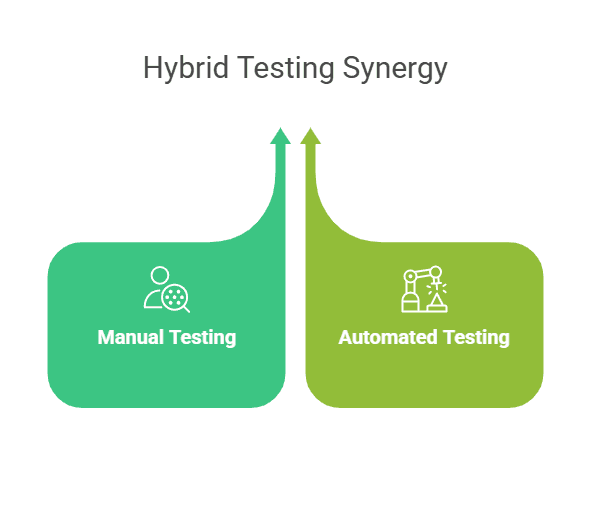
Hybrid smoke testing combines both manual and automated testing approaches. This strategy allows for the benefits of both methods, ensuring thorough coverage of the application's functionality while maintaining efficiency.
In a hybrid approach, test cases are developed manually by the testing team. However, the execution of these test cases is automated using software tools.
This combination ensures that test cases can be easily updated and maintained while leveraging the speed and consistency of automated testing.
When to Perform Smoke Testing?
Now that you’ve grasped the concept of smoke testing, let’s dive into the best times to integrate it into your development workflow!
Whenever you introduce a new feature or functionality, perform smoke testing to ensure that it integrates smoothly with the existing application. This helps verify that the new addition works as intended and does not disrupt the core functionality of the software.
After applying a major bug fix or update, smoke testing is essential to confirm that the fix resolves the issue without introducing new problems. This preliminary check ensures that the software's core features remain stable and operational.
Following a system upgrade, run smoke tests to validate that the upgrade process did not negatively impact the application. This step helps ensure that the upgraded system functions correctly and maintains its performance and stability.
When performing significant code refactoring, use smoke testing to verify that the refactored code still supports the application's primary functions. This early test helps catch any critical issues that might arise from changes in the code structure.
Before merging complex branches in your version control system, conduct smoke testing to check that the merge did not introduce any major issues. This practice helps ensure that integrating different code branches does not compromise the software’s core functionality.
By timing your smoke testing around these key events, you can maintain the integrity and stability of your application throughout its development cycle.
Process of Smoke Testing
There's no one-size-fits-all method for smoke testing; strategies often vary from company to company. As your organization evolves, you'll develop a tailored approach to smoke testing that fits your specific needs. In the meantime, follow these steps to integrate smoke tests effectively into your production environment.
Initial Steps
The process begins when the development team delivers a new build to the Quality Assurance (QA) team. This build includes the latest updates and changes to the software. The QA team prepares to test the build by setting up the necessary environment and test cases.
Execution
Next, the QA team runs quick, focused tests to check the basic functionalities of the application. These smoke tests are designed to ensure that essential features, such as launching the application, logging in, and navigating through key sections, are working correctly.
Outcome
Based on the results of the smoke tests, the build is either approved or rejected. If the build passes, it moves on to more detailed testing phases. If it fails, the build is returned to the development team for further fixes. This step is crucial for ensuring that only stable builds proceed to more extensive testing.
Examples of Smoke Test Cases
Verify Login Functionality
Test the login process by having users enter valid credentials and attempt to sign in. This test ensures that users can access their accounts without issues. Verify that the login page loads correctly, credentials are accepted, and users are directed to their dashboards or home pages as expected.
Check Navigation Menu
Make sure the navigation menu is accessible and responsive across all devices and screen sizes. Test that all menu items are visible, clickable, and lead to the correct sections of the application. This step verifies that users can easily navigate through the application without encountering broken links or hidden elements.
E-shop Cart
Simulate adding items to the shopping cart and proceeding to checkout. Verify that items are correctly added, quantities are updated, and the cart displays accurate totals. Test the checkout process to ensure that users can complete their purchase without issues and that the payment and confirmation screens function correctly.
Benefits of Smoke Testing
Smoke testing helps catch major problems at an early stage before they escalate. By verifying the basic functionalities of the application, teams can address critical issues before they impact more detailed testing or reach end users.
By catching fundamental issues early, smoke testing minimizes the time and resources required for later stages of testing. This efficiency prevents wasted efforts on detailed tests that might otherwise fail due to basic errors.
Regular smoke testing ensures that the core functionalities of the application remain stable and reliable. This practice contributes to a more robust application, reducing the likelihood of critical failures in production.
Early detection of significant issues gives teams the time needed to resolve them before they affect other parts of the development process. This proactive approach allows for timely fixes, preventing delays and costly corrections later on.
With smoke testing, teams can confidently move forward to more extensive testing and deployment stages. By addressing key issues early, the process of moving from development to deployment becomes smoother and faster.
Limitations of Smoke Testing
Absolutely, smoke testing can smooth out software issues and enhance your development process, allowing for more efficient builds and iterations.
However, it’s important to remember that smoke testing isn’t a cure-all. It has its limitations.
Not a Substitute for Exhaustive Testing Types
Smoke testing is not a replacement for more comprehensive testing methods. While it ensures that critical functionalities are working, it does not cover all aspects of the software. Detailed tests, such as unit, integration, and system tests, are necessary to thoroughly evaluate the application.
Limited in Scope and Depth
Smoke testing focuses on basic functionality, so it has a limited scope and depth. It checks whether the core features work but does not delve into the detailed behavior of each component. This limitation means it may miss issues that only appear under more complex or specific conditions.
Unable to Detect Performance Issues
Smoke testing does not assess the performance of the application. It cannot identify issues related to speed, scalability, or resource usage. For a complete performance evaluation, additional testing types like load and stress testing are required.
Smoke Testing Cycle
The process begins with the development team delivering a new build to the Quality Assurance (QA) team. This build includes the latest changes and updates to the software.
The QA team performs an initial smoke test on the new build. This involves running basic tests to verify that essential functionalities are working correctly and that the build is stable enough for further testing.
The QA team then prioritizes and executes test cases based on the smoke test results. They focus on critical functions to ensure that the build meets the minimum quality standards.
If the build passes the smoke test, it proceeds to more detailed and rigorous testing stages. If it fails, the build is sent back to the development team for necessary fixes. The process is repeated until the build is stable enough to advance to further testing.
Smoke Testing vs. Sanity Testing

Tools and Automation in Smoke Testing
Choosing the right tools for smoke testing is crucial for efficient and effective testing. Here are some popular frameworks:
Qodex.ai: Revolutionizing Automated Testing with AI

Qodex.ai is an innovative tool that uses the power of artificial intelligence to transform the landscape of automated testing. Employs AI algorithms to intelligently generate test cases based on the application’s functionality and user behavior patterns.
Its AI-driven approach simplifies the creation, execution, and maintenance of test cases, making it accessible even for teams with limited experience in test automation.
Additionally, Qodex.ai provides detailed reporting and analytics, offering actionable insights to improve software quality and streamline the debugging process.
Selenium

An open-source tool that supports automated testing of web applications across different browsers and platforms. Selenium is highly customizable and integrates well with various testing frameworks.
Testsigma

A cloud-based test automation tool that offers a unified approach to test management and execution. It supports various types of testing and allows for easy collaboration among team members.
QTP/UFT (Unified Functional Testing)
Micro Focus' commercial solution offers powerful functional and regression testing capabilities. It supports a diverse set of applications and technology.
Benefits of Automation: Time Efficiency, Consistency
Automating smoke testing brings several advantages:
Time Efficiency: Automated smoke tests run quickly and can be executed frequently, reducing the manual effort and time required for testing. This efficiency speeds up the development cycle and allows for faster feedback.
Consistency: Automation ensures that smoke tests are executed in the same manner each time, eliminating human error and providing consistent results. This reliability helps in maintaining software quality and identifying issues early.
Integration with CI/CD Pipelines
Integrating smoke testing with Continuous Integration/Continuous Deployment (CI/CD) pipelines enhances the testing process:
Jenkins

Jenkins is an open-source automation server that supports continuous integration and delivery. Jenkins can automate the running of smoke tests whenever code changes are made, ensuring early discovery of errors.
GitLab CI

A feature within GitLab that supports continuous integration and deployment. It allows for seamless integration of smoke tests into the CI/CD pipeline, automating test execution and providing immediate feedback on build quality.
Best Practices for Smoke Testing
Design Simple and Straightforward Test Cases
Keep your smoke test cases simple and direct. Focus on the core functionalities and critical paths of the application. Avoid complex scenarios that might complicate the testing process. This approach ensures that smoke tests are quick to execute and easy to understand, providing a clear pass-or-fail outcome.
Clearly Define Testing Criteria
Establish precise criteria for what constitutes a pass or fail in your smoke tests. Clearly defined criteria help maintain consistency and ensure that all team members have a unified understanding of what needs to be tested. This clarity reduces ambiguity and helps in accurately assessing the build’s stability.
Assign Experienced QA Engineers
Allocate experienced QA engineers to conduct smoke tests. Their expertise will enhance the effectiveness of the tests and help quickly identify critical issues. Experienced testers are more adept at recognizing potential problems and understanding the implications of test results, which contributes to more reliable outcomes.
Regular Reviews and Adjustments
Continuously review and adjust your smoke testing process. As the application evolves, your test cases and criteria should be updated to reflect new features or changes. Regular reviews ensure that your smoke tests remain relevant and effective, helping to catch issues early in the development cycle.
Consider Automation for Frequent Tests
Automate smoke testing for builds that are regularly issued or changed. Automation can minimize manual labor and expedite the testing process. By integrating automated smoke tests into your CI/CD pipeline, you ensure that critical functionalities are checked consistently and efficiently, allowing for quicker feedback and resolution of issues.
Conclusion
Smoke testing plays an important role in maintaining software stability by identifying major issues early in the development cycle. Integrating smoke testing into your development workflow provides long-term benefits such as higher software quality, faster deployment timelines, and more efficient resource utilization.
Ready to enhance your smoke testing process? Explore Qodex.ai today and discover how AI-driven automation can streamline your testing, improve accuracy, and save you time. Don’t let your software go up in flames! Visit Qodex.ai now and take the first step towards smarter, more efficient smoke testing.
Frequently Asked Questions
Why should you choose Qodex.ai?
Qodex.ai simplifies and accelerates the API testing process by leveraging AI-powered tools and automation. Here's why it stands out:
- AI-Powered Automation
Achieve 100% API testing automation without writing a single line of code. Qodex.ai’s cutting-edge AI reduces manual effort, delivering unmatched efficiency and precision.
- User-Friendly Platform
Effortlessly import API collections from Postman, Swagger, or application logs and begin testing in minutes. No steep learning curves or technical expertise required.
- Customizable Test Scenarios
Whether you’re using AI-assisted test generation or creating test cases manually, Qodex.ai adapts to your needs. Build robust scenarios tailored to your project requirements.
- Real-Time Monitoring and Reporting
Gain instant insights into API health, test success rates, and performance metrics. Our integrated dashboards ensure you’re always in control, identifying and addressing issues early.
- Scalable Collaboration Tools
Designed for teams of all sizes, Qodex.ai offers test plans, suites, and documentation that foster seamless collaboration. Perfect for startups, enterprises, and microservices architecture.
- Cost and Time Efficiency
Save time and resources by eliminating manual testing overhead. With Qodex.ai’s automation, you can focus on innovation while cutting operational costs.
- Continuous Integration/Delivery (CI/CD) Compatibility
Easily integrate Qodex.ai into your CI/CD pipelines to ensure consistent, automated testing throughout your development lifecycle.
How can I validate an email address using Python regex?
You can use the following regex pattern to validate an email address: ^[a-zA-Z0-9._%+-]+@[a-zA-Z0-9.-]+\.[a-zA-Z]{2,}$
What is Go Regex Tester?
Go Regex Tester is a specialized tool for developers to test and debug regular expressions in the Go programming environment. It offers real-time evaluation of regex patterns, aiding in efficient pattern development and troubleshooting
Discover, Test, & Secure your APIs 10x Faster than before
Auto-discover every endpoint, generate functional & security tests (OWASP Top 10), auto-heal as code changes, and run in CI/CD - no code needed.
Related Blogs